What is Geometry Dash?
Geometry Dash is a rhythm-based platformer game that has captivated millions of players worldwide. Created by Robert Topala (RobTop Games) and released in 2013, this game combines the simplicity of one-button controls with the complexity of challenging level design. The core mechanic is straightforward: tap to jump, but the execution requires precision timing, pattern recognition, and musical synchronization. You can download the official game from the App Store or Google Play.
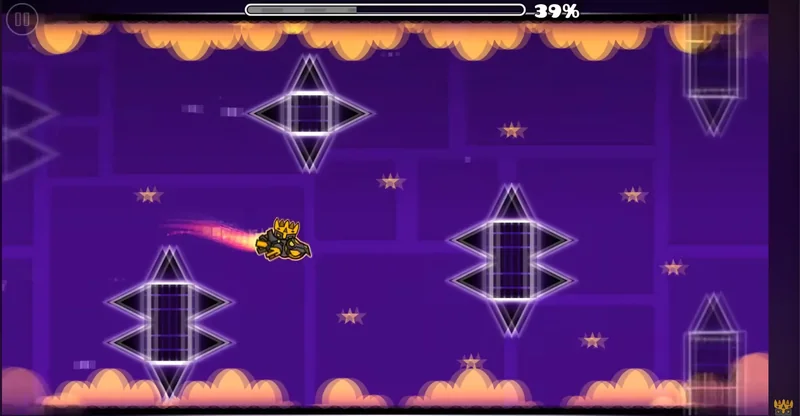
The game operates on a simple principle: "Die and Retry." Each level failure sends you back to the beginning, but the game is designed so that you learn from each attempt. This addictive gameplay loop has made Geometry Dash one of the most popular platformer games on mobile platforms and web browsers. The game has received numerous updates, with the highly anticipated Update 2.2 bringing exciting new features and gameplay mechanics.
How to Play Geometry Dash
Playing Geometry Dash is simple to learn but challenging to master. Your character moves automatically from left to right across the screen. Your only control is making your character jump. The timing of your jumps is critical—you must jump at exactly the right moment to avoid obstacles and reach the end of each level.
Basic Controls
- PC: Press spacebar, click left mouse button, or press up arrow to jump
- Mobile: Tap anywhere on the screen to jump
- Keyboard: Use arrow keys or WASD for alternative controls
The key to success is listening to the music and watching the patterns. Most obstacles appear in sync with the beat, so experienced players use the soundtrack as a guide for when to jump. This synchronization between music and gameplay is what makes Geometry Dash unique among geometry platformers.
Gameplay Mechanics
Geometry Dash features several core mechanics that define the gameplay experience:
Gravity and Physics
Your character is affected by gravity, falling when not jumping. Different sections of levels feature gravity portals that reverse the direction of gravity, forcing you to adapt your jumping patterns. Understanding gravity mechanics is essential for progression.
Speed Changes
Throughout levels, you'll encounter speed portals that increase or decrease your movement speed. These changes require you to adjust your timing accordingly. Faster sections demand quicker reflexes, while slower sections allow for more deliberate jumps.
Obstacle Types
Geometry Dash features various obstacle types including spikes, moving platforms, rotating obstacles, and more. Each obstacle type requires different strategies to overcome. Learning to recognize and respond to each obstacle type is crucial for beating difficult levels.
Game Modes and Character Forms
One of Geometry Dash's defining features is the variety of game modes. Your character transforms into different forms, each with unique physics and controls:
The Cube Form
The cube is your default form. It jumps over obstacles with standard gravity physics. This is the most intuitive form and is used in most levels. Master the cube form first before attempting other character types.
The Ship Form
In ship mode, your character flies up and down instead of jumping. Tapping makes you go up, and releasing makes you go down. This form requires smooth, controlled movements and is often considered more difficult than the cube.
The Ball Form
The ball bounces and switches gravity with every tap. It demands very precise timing and is challenging for most players. The ball form teaches you about gravity mechanics and momentum.
The UFO Form
The UFO hovers and requires you to control its vertical position. This form is less common but appears in specific level sections. It requires a different approach than other forms.
The Wave Form
The wave moves up and down in a wave-like pattern. Tapping controls its vertical position. This form is particularly challenging and requires excellent timing.
The Robot Form
The robot can jump multiple times, making it more forgiving than other forms. It's often used in easier sections or as a reward for skilled players.
The Spider Form
The spider can climb on surfaces and walls. This form opens up new level design possibilities and requires players to think differently about navigation.
Difficulty Levels
Geometry Dash features a wide range of difficulty levels, from beginner-friendly to impossibly hard:
Easy Levels (1-2 stars)
Perfect for learning the basics. These levels teach fundamental mechanics with simple obstacles and straightforward patterns. Beginners should start here.
Medium Levels (3-4 stars)
Intermediate challenges that introduce multiple game modes and more complex patterns. These levels require solid fundamentals and practice.
Hard Levels (5-6 stars)
Challenging levels that demand precision and pattern memorization. These levels are where most players struggle and need significant practice.
Insane Levels (7-8 stars)
Extremely difficult levels requiring expert-level skills. Only experienced players should attempt these levels.
Extreme Levels (9-10 stars)
The hardest levels in the game. These are designed for the most skilled players and require hundreds of attempts to complete.
Tips and Tricks for Success
Here are expert tips to help you improve your Geometry Dash skills:
- Listen to the music: The soundtrack is your guide. Obstacles sync with the beat, so use the music to anticipate jumps
- Use practice mode: Place checkpoints to practice difficult sections without restarting from the beginning
- Study patterns: Watch how obstacles move and appear. Understanding patterns is key to success
- Don't rush: Focus on consistency over speed. Accurate jumps matter more than fast reactions
- Take breaks: Playing when frustrated leads to mistakes. Step away and return with fresh eyes
- Watch tutorials: Watching experienced players can teach you new techniques and strategies
- Practice specific sections: Use practice mode to master difficult parts before attempting full levels
- Learn from failures: Each failed attempt teaches you something. Analyze what went wrong
- Stay calm: Panic leads to mistakes. Maintain focus and composure during difficult sections
- Customize your character: Unlock and use icons that help you see your character better
Geometry Dash Versions
The Geometry Dash franchise includes several versions, each with unique content and themes:
| Version | Theme | Difficulty | Best For |
|---|---|---|---|
| Geometry Dash Lite | Beginner-friendly | Easy to Medium | New players |
| Geometry Dash Meltdown | Dark/Neon | Medium to Hard | Experienced players |
| Geometry Dash SubZero | Winter/Icy | Medium to Hard | Seasonal players |
| Geometry Dash Breeze | Colorful/Vibrant | Easy to Medium | Casual players |
Game Controls Reference
Master these controls to play Geometry Dash effectively:
| Platform | Jump Control | Alternative |
|---|---|---|
| PC - Keyboard | Spacebar | Up Arrow / W Key |
| PC - Mouse | Left Click | Right Click |
| Mobile | Tap Screen | Touch Anywhere |
| Tablet | Tap Screen | Touch Anywhere |
Key Features of Geometry Dash
- One-button gameplay: Simple controls that are easy to learn but hard to master
- Rhythm synchronization: Obstacles sync perfectly with the music for an immersive experience
- Multiple game modes: Seven different character forms with unique physics
- Challenging levels: Hundreds of official levels with varying difficulty
- Level editor: Create and share your own custom levels
- Community content: Thousands of user-created levels to play
- Customization: Unlock and customize your character with different icons and colors
- Practice mode: Place checkpoints to practice difficult sections
- Achievements: Complete challenges and unlock achievements
- Cross-platform: Play on PC, mobile, web, and more
Frequently Asked Questions
Is Geometry Dash really free?
Yes, Geometry Dash is completely free to play on geometrydash.ie. There are no hidden costs, no in-app purchases required, and no ads interrupting gameplay. Simply open your browser and start playing instantly.
Do I need to download anything to play?
No downloads are required. Geometry Dash runs directly in your web browser. Just visit geometrydash.ie and start playing immediately.
Can I play Geometry Dash offline?
The web version requires an internet connection. However, the mobile versions (iOS and Android) can be played offline after downloading.
What's the difference between Geometry Dash versions?
Each version has different levels, music, visual themes, and difficulty levels. Lite is beginner-friendly, Meltdown is dark-themed, SubZero is winter-themed, and Breeze is colorful.
How long does it take to beat Geometry Dash?
Beating all official levels can take anywhere from 10-50 hours depending on your skill level. However, with community-created levels, there's virtually unlimited content.
Is Geometry Dash suitable for children?
Yes, Geometry Dash is suitable for children. It has no violence or inappropriate content. However, some levels can be frustrating due to difficulty, so parental guidance is recommended for very young children.
Can I play Geometry Dash with friends?
The main game is single-player, but you can compete with friends by comparing completion times and achievements.
What are the system requirements?
Geometry Dash works on any device with a modern web browser (Chrome, Firefox, Safari, Edge). No special hardware is required.
Is there a leaderboard?
Yes, Geometry Dash features leaderboards where players can compete for the fastest completion times on various levels.
Can I create my own levels?
Yes, the full version of Geometry Dash includes a level editor where you can create custom levels and share them with the community.
Conclusion
Geometry Dash is more than just a game—it's a cultural phenomenon that has captivated millions of players worldwide. With its addictive gameplay, beautiful visuals, and perfectly synchronized music, it offers an experience that few games can match. Whether you're a casual player looking for a fun distraction or a hardcore gamer seeking the ultimate challenge, Geometry Dash delivers on all fronts.
Start your Geometry Dash journey today on geometrydash.ie. Play free online, no downloads required. Master the rhythm, time your jumps perfectly, and experience the thrill of completing increasingly difficult levels. Join millions of players in one of the most beloved games ever created.
Ready to Play?
Start playing Geometry Dash now and challenge yourself with our collection of games:
- Play Geometry Dash Lite - Perfect for beginners
- Play Geometry Dash Meltdown - Dark-themed challenges
- Play Geometry Dash SubZero - Winter adventure
- Play Geometry Dash Breeze - Colorful fun